 Flowbar
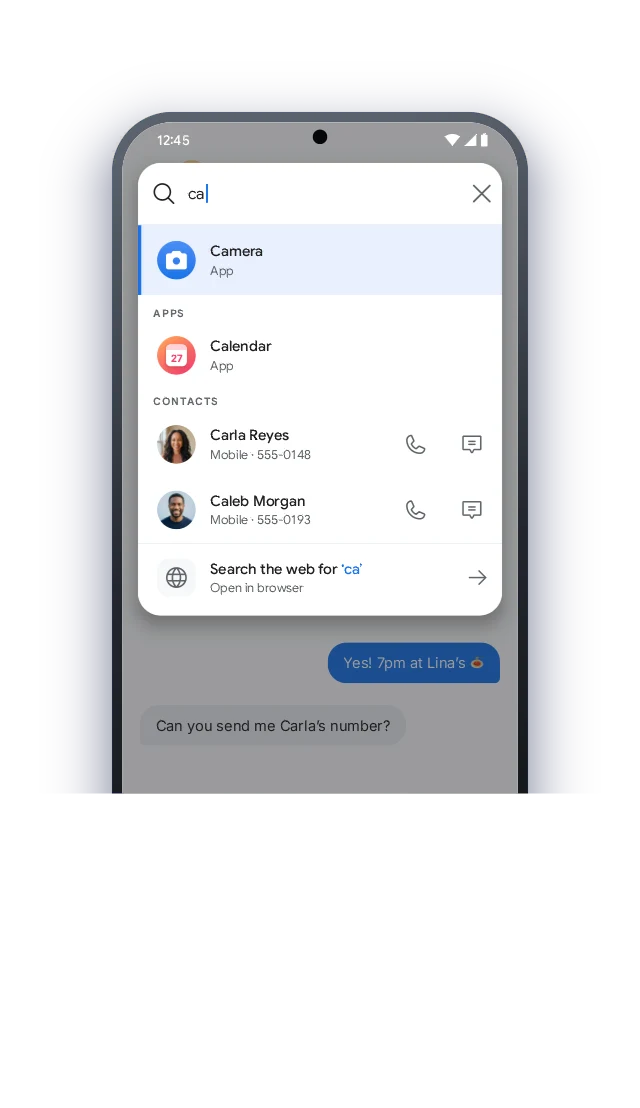
It looks on your phone first
The search bar on most home screens belongs to Google, so it searches the web. Flowbar checks your apps, contacts, calendar and saved links first, and only then offers the web.
- AppsNo more scrolling the app drawer. It matches any word in the name, so "files" finds My Files.
- ContactsType a name, then tap call or message. Off until you turn it on.
- CalendarFind your next meeting by name and join the call from the result.
- Saved linksSave the sites you visit most and open them by typing their name.
- MathsType 12*18+40 and copy the answer. No calculator app needed.
- Web searchWhen it isn't on your phone, send the search to your browser.
- Quick accessOpen Flowbar and the things you used last, plus up to four pins, are already there.
- Light and darkFollows your phone's theme, or pick one.
Opens over any app
You're in a chat and need to check your calendar. Normally that means going home, opening the app drawer and scrolling. Flowbar opens on top of the chat with the keyboard already up.
The edge handle
A small tab on the side of your screen. Because it's always in sight, you won't forget Flowbar is there. Drag it anywhere along the edge so it stays out of your way.
Your assistant gesture
If you rarely use the assistant, give its gesture a better job. Set Flowbar as your assistant app, and the corner swipe or power-button hold opens search instead.
Flowbar isn't a launcher, so your home screen stays exactly as it is, whether that's Pixel Launcher, One UI, Nova or Niagara.
Make it match your setup
Flowbar Plus is one purchase: 20+ themes and characters for your search bar and edge handle, and every Plus feature we add later.
Pay once and keep it on every phone with your Google account. Every search feature is free without it.
No ads, no account, no tracking
A search app sees your apps, contacts and calendar, so here is what Flowbar does with them: keeps them on your phone. It goes online for two things only: downloading icons for links you save, and confirming a Flowbar Plus purchase. Read the privacy policy.
Questions
Is Flowbar a launcher?
No. Flowbar works on top of the launcher you already use, whether that's Pixel Launcher, One UI, Nova, Niagara or anything else. Keep your home screen and add search.
How do I open Flowbar?
Two ways. Tap the small edge handle on the side of your screen from any app, and drag it anywhere along the edge. Or set Flowbar as your digital assistant app and open it with the gesture you already use, like swiping up from a bottom corner or holding the power button.
What can Flowbar search?
Your installed apps, contacts (call or text in one tap), upcoming calendar events (open them or join online meetings), links you save, maths, and the web, with results in your browser. It matches the start of any word, so typing "files" finds "My Files".
Does Flowbar need the Accessibility permission?
No. The edge handle uses Android's "display over other apps" permission. Contact and calendar search are optional and stay off until you turn them on.
Is Flowbar free?
Yes. Every search feature is free, with no ads. Flowbar Plus is an optional one-time purchase on Google Play that unlocks 20+ themes and characters for the search bar and edge handle, plus every Plus feature added later.
What happens to my data?
Flowbar has no account, no ads, no analytics and no tracking. Your searches, contacts, calendar events and saved links stay on your phone. Flowbar only goes online to download icons for links you save and to confirm a Flowbar Plus purchase.
Which phones does Flowbar work on?
Any phone running Android 12 or later.
Can Flowbar replace Sesame Search?
For most people, yes. Sesame hasn't been updated since 2022. Flowbar covers apps, contacts, calendar, links, maths and web search, and opens over any app. It doesn't have Sesame's deep shortcuts into other apps, such as a specific playlist or chat. More on switching from Sesame.
Is there Spotlight or Raycast for Android?
Not from Apple or Raycast. Flowbar is our version of that kind of search for Android: open it from anywhere, start typing, pick the result. It doesn't have Raycast's extensions or AI features. More in our guides to Spotlight-style search on Android and Raycast for Android.
Why does the search bar on my home screen open Google?
On most Android phones that bar is Google's, so it searches the web. On Pixel phones, tapping it has opened the Google app since December 2025. Flowbar searches your phone first: apps, contacts, calendar and saved links, then the web if you want it. More on the Pixel search bar.
Free on Google Play for Android 12 and later.